Vibe coding security: 9 risks to check before real users (with a checklist)
By El Mamoune El Baraka, product designer.
Short answer
- AI writes code that works but often isn't safe: in Veracode's 2026 tests, AI-generated code passed only 56% of security checks, a rate that hasn't improved in a year.
- The risks that hurt vibe-coded apps most are simple ones: customers who can read each other's data, secret keys in the browser, checks that only happen in the UI, invented packages, and an agent with access to production.
- Each one can be tested in minutes without being a security expert. The checklist at the end covers what to do before the first real user signs up.
Part of the guide Vibe coding for designers: from Figma file to live app.
Why vibe coding needs its own security checklist
When you write code by hand, the slow parts are where you notice problems. Vibe coding removes the slow parts. A feature appears, it works in the preview, and it ships. The AI did what you asked, and nobody asked it who should be allowed to see the data.
The numbers back this up. In Veracode's 2025 report, AI models introduced a security flaw in 45% of the coding tasks they were given. A year later, the 2026 report found the average security pass rate stuck at 56%, even though the code compiles almost every time. Models got better at writing code, not at writing safe code.
I built Profilapp, a booking SaaS that holds restaurant and guest data, with Claude Code and Cursor. The checks below are the ones that matter most for a product like that. You don't need to be a security engineer to run these checks. You need to know where to look.
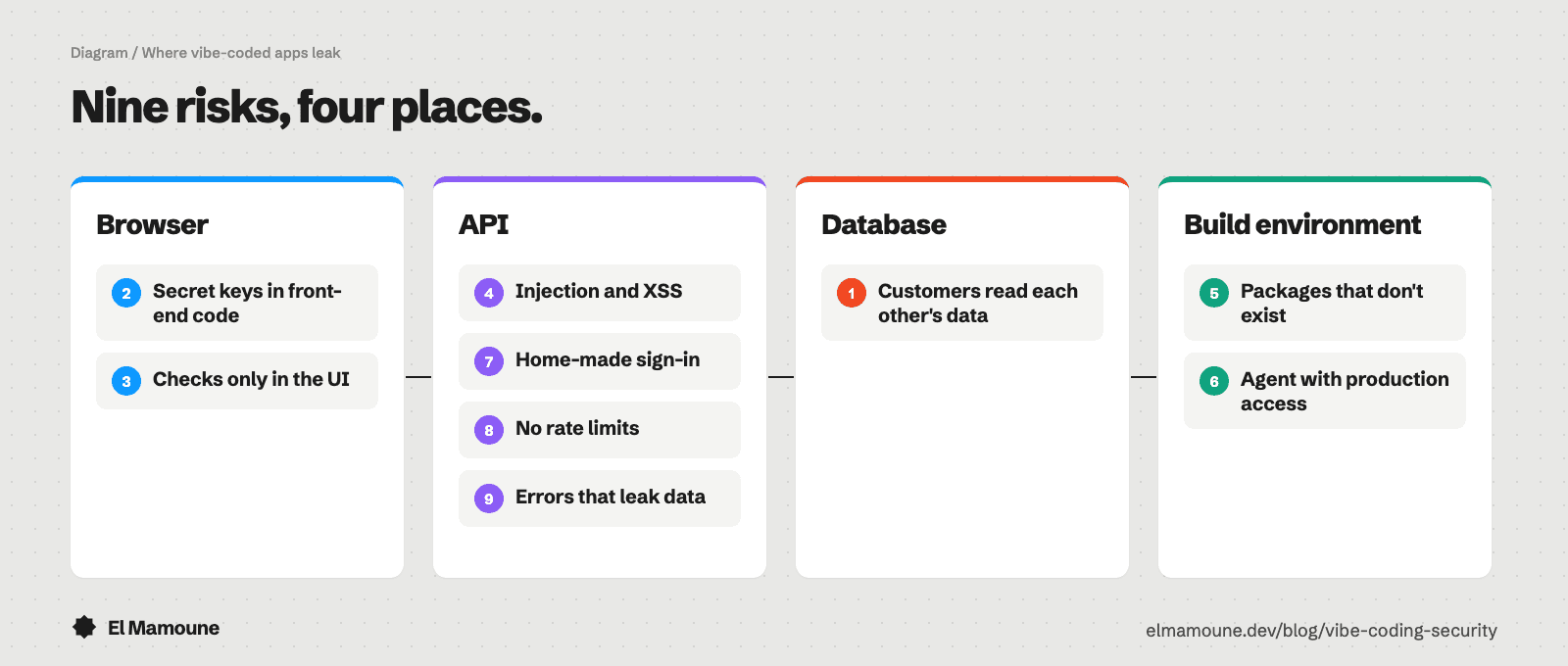
The 9 vibe coding security risks
For each one: what goes wrong, how to check it yourself, and what to ask the AI.
1. Customers can read each other's data
This is the most common and most damaging one. The app shows each user only their own records on screen, but the database will hand any record to anyone who asks. In 2025, a researcher scanned 1,645 apps built with Lovable and found 170 where the database could be read by anyone, tracked as CVE-2025-48757 with a critical 9.3 score. The cause was missing or too-open row-level security in the Supabase database.
How to check it: create two test accounts, add data with account A, sign in as account B and try to load A's records by changing the ID in the URL or the request. If you use Supabase, read its guide to row-level security and run its security advisor.
Show me, table by table, how the database stops user A from reading or changing user B's rows.
Then write an automated test that signs in as two different users and proves it.
Don't change any policy until I've read your answer.
2. Secret keys shipped to the browser
AI tools often put an API key wherever it makes the code work, including in front-end code that every visitor downloads. In Next.js, anything prefixed with NEXT_PUBLIC_ ends up in the browser. A leaked payment, email or AI key can cost real money within hours.
How to check it: open your site, view the page source and the JavaScript files in the browser's developer tools, and search for "key", "secret" and "sk_". Turn on secret scanning on your GitHub repository so a committed key gets flagged.
3. Checks that only happen in the UI
A hidden admin button, a price set in the checkout form, a role stored in the browser: they all look secure until someone sends the request directly. The rule is simple: the server decides who you are and what you can do, never the page.
How to check it: for each action that matters (pay, delete, invite, change role), ask whether the server checks the user's permission and recalculates the price, or trusts what the browser sent.
4. Injection and cross-site scripting
When user input ends up in a database query or on a page without being cleaned, attackers can run their own queries or scripts. This is where AI does worst: in Veracode's 2026 tests, models failed to protect against cross-site scripting 85% of the time.
How to check it: type <script>alert(1)</script> into every text field that is shown back to users, like names, comments and notes. If a pop-up appears, you have a problem. Ask the AI to use the framework's built-in escaping and parameterized queries, and to remove every raw HTML insertion it can't justify.
5. Packages that don't exist (slopsquatting)
AI models sometimes recommend libraries that don't exist. Attackers register those names and publish malware under them, a trick called slopsquatting. In a study of 576,000 code samples from 16 models, published at USENIX Security 2025, about 20% of the packages the models recommended were not real.
How to check it: before installing anything the AI suggests, look it up on npm or PyPI. Check that it has a real repository, recent releases and a meaningful number of downloads. Run npm audit after every install session.
6. An agent with access to production
Coding agents run commands. If the agent can reach your production database, one wrong command can delete it. In July 2025, Replit's agent deleted a live database during a code freeze in a public experiment by SaaStr's founder. A code freeze written in a chat doesn't stop anything; only permissions do.
How to check it: make sure development and production use different databases and different keys, the agent only ever has development credentials, and production has automatic backups you've actually restored once.
7. Sign-in and sessions built from scratch
Ask an AI to "add login" and it may write its own password storage, session handling and reset flow. Each piece is a place to get security wrong.
How to check it: use a proven auth provider (Supabase Auth, Clerk, Auth.js) instead of custom code, and test the edges: a reset link used twice, an expired session, signing out on one device.
8. No limits on sign-ups, forms and AI features
Without rate limits, a script can create thousands of accounts, flood your contact form or call your AI feature until your bill explodes. Vibe-coded apps almost never have limits, because nobody asked for them.
How to check it: list every endpoint that costs money or sends email, and add a limit per user and per IP address. Put a spending cap on every paid API key.
9. Data you didn't mean to expose
Error pages that show stack traces, logs full of email addresses and tokens, file uploads in a public storage bucket, an API that returns the whole user object when the page needs only the name. Each one leaks more than the feature needs.
How to check it: trigger an error on purpose and see what the page shows, open your storage settings, and look at what your API actually returns in the browser's network tab.
The vibe coding security checklist before launch
Run through this before the first real user signs up, and again before each big release. It takes an afternoon.
| Check | How | Done when |
|---|---|---|
| Data isolation | Two test accounts, try to read each other's data | Every attempt fails, and a test proves it |
| Secrets | Search the shipped JavaScript; enable GitHub secret scanning | No private key in the browser or the repo |
| Server-side checks | Send requests directly for pay, delete, invite, role | The server rejects anything not allowed |
| Input | Script tag in every visible text field | Text shows as text, nothing runs |
| Packages | Look up every new dependency, run npm audit | No unknown or vulnerable packages |
| Environments | Separate dev and prod databases and keys | The agent never holds production credentials |
| Backups | Restore a backup once | You know it works and how long it takes |
| Auth | Proven provider; test reset, expiry, sign-out | No custom password code |
| Rate limits | Limits on sign-up, email, AI endpoints; spending caps | A script can't run up your bill |
| Errors and logs | Trigger an error; read your logs | No stack traces, tokens or personal data exposed |
| Storage | Check bucket permissions | Private files need a signed URL |
| Updates | Dependabot or weekly npm audit | Someone owns the alerts |
A security review prompt you can reuse
Give this to your AI coding tool before launch. It won't replace a human review, but it finds a lot of the obvious problems in one pass.
Act as a security reviewer for this app before launch. Don't change code yet.
Check and report, with file and line for each finding:
1. Every table: can a signed-in user read or change another user's rows?
2. Any secret key or token that reaches the browser or is committed to the repo.
3. Any permission, price or role decided in the front end instead of the server.
4. Any user input rendered as HTML or used in a raw query.
5. Every dependency added in the last month: does it exist, is it maintained?
6. Endpoints that send email, cost money or call AI without a rate limit.
7. Error responses or logs that expose stack traces, tokens or personal data.
Sort findings by risk: what could leak customer data first.
Then fix one finding per prompt, with a test for each. The rest of my workflow is in 12 vibe coding best practices, and the prompts I use for each build stage are in 23 vibe coding prompts.
Is vibe coding safe for a real product?
It can be, the same way hand-written code can be: with review. The tools are not the problem. The OWASP Top 10 risks haven't changed because AI writes the code; what changed is how fast an app can reach real users before anyone checks them.
Some tools now help: Lovable added a security scan after its incident, Supabase has a security advisor, and GitHub flags leaked secrets. Use them, but don't treat a green check as proof. If your app holds other people's data or money, get a person to review it before launch. That can be a developer friend, a security freelancer or, for the product side, a designer who builds with these tools. Which tool you build with matters less, but if you're still choosing, see the best vibe coding tools.
Questions people ask
- What are the biggest security risks of vibe coding?
- Missing data isolation between customers, secret keys exposed in the browser, permission checks that only happen in the UI, injection and cross-site scripting, invented packages (slopsquatting), and AI agents with access to production databases.
- Is AI-generated code secure?
- Often not by default. Veracode's 2026 report found AI-generated code passed only 56% of security tests on average, while compiling almost every time. Treat AI code like code from a fast junior developer: useful, but reviewed before it touches real data.
- Are apps built with Lovable, Bolt or Replit safe?
- They can be, but the platform doesn't make your app safe for you. The 2025 Lovable vulnerability (CVE-2025-48757) exposed data in 170 of 1,645 scanned apps because database access rules were missing. Check row-level security, secrets and permissions yourself before launch.
- What is slopsquatting?
- An attack where criminals register package names that AI models invent, then publish malware under those names. Before installing a package an AI suggests, check that it exists, has a real repository and is actively maintained.
- How do I secure a vibe-coded app without being a security expert?
- Run the 12-point checklist in this article: test data isolation with two accounts, search for exposed keys, check permissions on the server, use a proven auth provider, add rate limits, separate dev and prod, and test your backups. Then ask a person to review anything that handles money or personal data.
Vibe coding your SaaS? Send me the link.
I'll reply with a free 5-minute video of what I'd fix first in the design and the flows.
hello@elmamoune.dev