Vibe coding best practices: 12 rules from a designer who shipped a real SaaS
By El Mamoune El Baraka, product designer.
Short answer
- Vibe coding works when you decide what to build before the AI writes anything: a one-page spec, the main screens, and a small design system.
- While building, ask for one screen or one rule at a time, commit every working step, start a new chat for each feature, and check the result in a real browser at phone size.
- Before launch, prove that one customer can never see another customer's data, keep secrets on the server, test the flows people pay for end to end, and watch a real user try it.
- Most guides stop at prompting and code review. The expensive mistakes I made building Profilapp were in design drift, data access and untested user flows, so this guide spends its time there.
Part of the guide Vibe coding for designers: from Figma file to live app.
What vibe coding best practices are
Vibe coding means building software by describing what you want to an AI coding tool, such as Claude Code, Cursor or Lovable, and letting it write most of the code. Andrej Karpathy named it in February 2025, and it has since become the usual word for AI-assisted building. Best practices are the habits that turn that speed into an app people can rely on, instead of a demo that breaks the first time a stranger uses it.
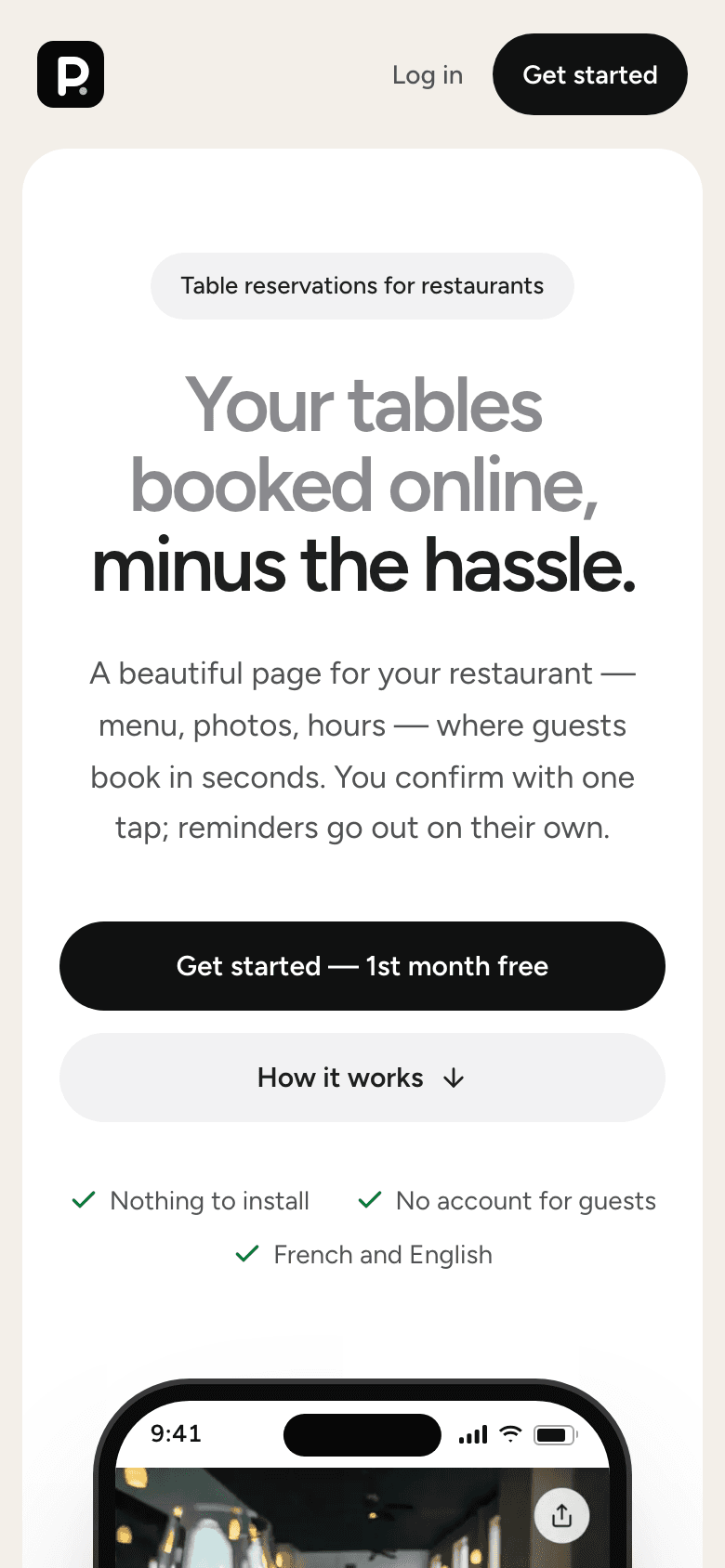
I'm a product designer, not a full-time engineer. I designed Profilapp, a booking page and dashboard for restaurants, in Figma and built it with Claude Code and Cursor on Next.js, Supabase and Vercel. It is live and was tested with a real restaurant owner and their guests (the full story is here). These 12 rules are what I'd tell a founder or designer starting the same way.
The 12 rules at a glance
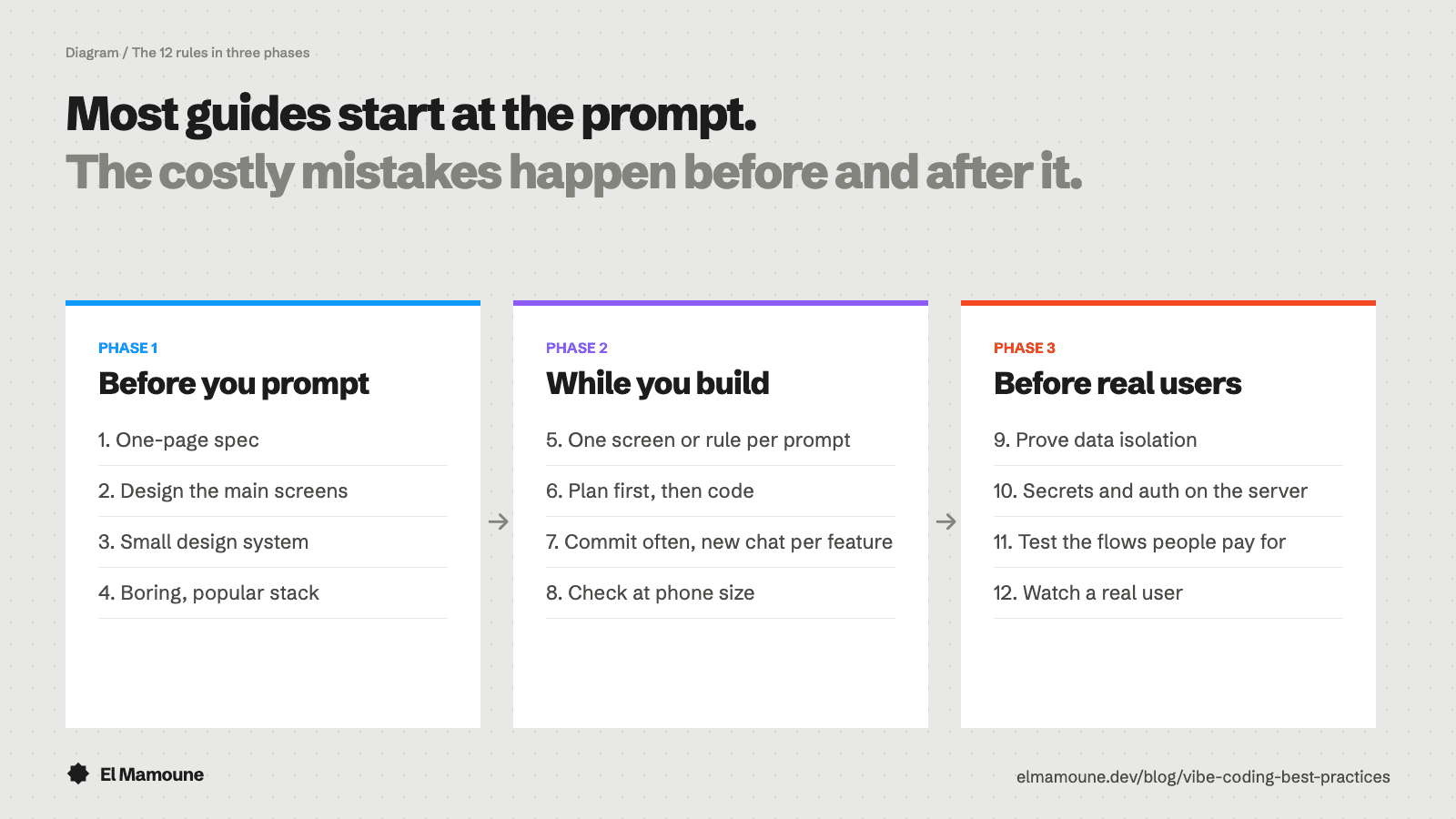
| Rule | Why it matters |
|---|---|
| 1. Write a one-page spec | The AI fills every gap you leave with a guess |
| 2. Design the main screens first | A screenshot is a clearer prompt than a paragraph |
| 3. Lock a small design system | Stops every new screen from inventing its own style |
| 4. Pick a boring, popular stack | AI tools have seen it millions of times |
| 5. One screen or one rule per prompt | Big asks look right and break on edge cases |
| 6. Plan first, then code | You catch wrong assumptions before they become code |
| 7. Commit every working step, new chat per feature | Your undo button, and a fresh context |
| 8. Check it in a real browser at phone size | Compiling is not the same as working |
| 9. Prove data isolation | One leaked customer record can end a SaaS |
| 10. Keep secrets and auth on the server | Anything in the browser is public |
| 11. Test the flows people pay for | Sign-up, booking and checkout must never break |
| 12. Watch a real user | They will find what you and the AI missed |
Before you prompt
The top guides on this topic start at the prompt. By then the most important decisions are already made, usually by the AI. The four rules below take an afternoon and save weeks.
1. Write a one-page spec before any code
List who uses the product, what each of them is trying to get done, and the edge cases. For Profilapp that meant a fully booked night, a party of twelve, a guest booking from inside Instagram's browser, and a restaurant with two branches.
This page becomes the context you paste into every new chat. It's also the cheapest place to change your mind.
# Product
One sentence: who it's for and what it lets them do.

# Users and jobs
- Guest: book a table in under a minute, no account
- Owner: see tonight's bookings and confirm in one tap

# Rules
- A table can't be booked twice for the same time
- Bookings close 2 hours before service

# Edge cases
- Fully booked night, large party, two branches, in-app browser

# Out of scope (for now)
- Payments, reviews, loyalty
2. Design the main screens before you build them
You don't need a polished Figma file. Wireframes of the two or three flows that matter most are enough. In Profilapp those were the guest booking flow and the owner confirming a booking.
Then give the AI the picture, not a description. A screenshot or an annotated sketch removes most of the guessing about layout, hierarchy and what goes where. This is the single biggest advantage a designer has when vibe coding, and it's easy for anyone to borrow.
3. Lock a small design system early
Without one, every screen the AI builds invents its own colors, spacing and button styles, and after ten prompts the app looks like ten apps. Put a handful of design tokens in one file (in Tailwind, that's your theme) and tell the AI to use only those.
Profilapp had to work in English, French and right-to-left Arabic, so the components were built from day one with CSS logical properties to flip direction instead of having a second set of screens. Decisions like that are cheap at the start and very expensive to retrofit.
## Design rules
- Use only the color, spacing and font tokens in app/globals.css. Never hard-code a hex value.
- Reuse components from /components before creating a new one.
- Every screen must work at 390px wide first, then desktop.
- Text must also work right-to-left (Arabic). Use logical properties (ms-, me-, ps-, pe-).
- Don't change the layout or style of a screen unless the task asks for it.
AI coding tools read these files at the start of every session, so a rule written once is applied to every prompt: CLAUDE.md for Claude Code, AGENTS.md for most other agents, and rules in Cursor.
4. Pick a boring, popular stack
AI tools are best at what they've seen most. I used Next.js, React, TypeScript and Tailwind for the app, Supabase for the database, auth and storage, and Vercel for hosting. When something breaks on a popular stack, the AI usually knows the fix. On an exotic one it guesses, and you pay for the guesses.
While you build
This is where the other guides are strongest. Here is the short version that worked for me, plus the step most of them skip.
5. Ask for one screen or one rule per prompt
When I asked for a whole feature at once, I got code that looked right and broke on the edge cases from the spec. When I asked for one screen or one rule, checked it, then moved on, it held. Small requests also make it obvious which change broke what. The prompts I reuse for each stage are in 23 vibe coding prompts for building a SaaS.
Context: [paste the relevant part of spec.md, attach the screen design]

Do:
- Build the "confirm booking" button on the owner dashboard
- Confirming sends the guest a confirmation message

Don't:
- Change any other screen or the database schema
- Add new libraries

Done when:
- I can confirm a booking at 390px and on desktop
- The booking shows as confirmed after a page refresh
6. Plan first, then let it code
Ask the AI for a short plan before it writes anything: which files it will touch, what it will add, and what it assumes. Most tools have a plan mode for this, and Teresa Torres makes the same case in her guide to the vibe coding doom loop. Reading a ten-line plan takes a minute. Untangling a wrong assumption after it's spread across eight files takes an evening.
7. Commit every working step and start a new chat per feature
Git is your undo button. Commit each time something works, with a message that says what works. When the AI goes in circles fixing the same bug, don't argue with it: go back to the last good commit and start a fresh chat with a clearer prompt. Long chats drift and the model starts repeating its own mistakes.
8. Check every change in a real browser at phone size
"It compiles" and "the tests pass" are not the same as "a person can use it". Open the page at 390px wide, tap through it, and try it inside the browsers people actually use. For Profilapp many guests arrive from Instagram and WhatsApp links, so the booking flow had to work in those in-app browsers, not just in Chrome on a laptop.
If you can, automate the check: a small Playwright script that opens your main pages and takes screenshots catches layout breaks before you ship them. Your landing page gets the most phone traffic, so start there; this SaaS landing page checklist covers the mobile checks.
Before real users touch it
This is the part the top-ranking guides mostly skip, and it's where a vibe coded SaaS gets into real trouble. A demo can be wrong. A product holding other people's data can't.
9. Prove that one customer can never see another's data
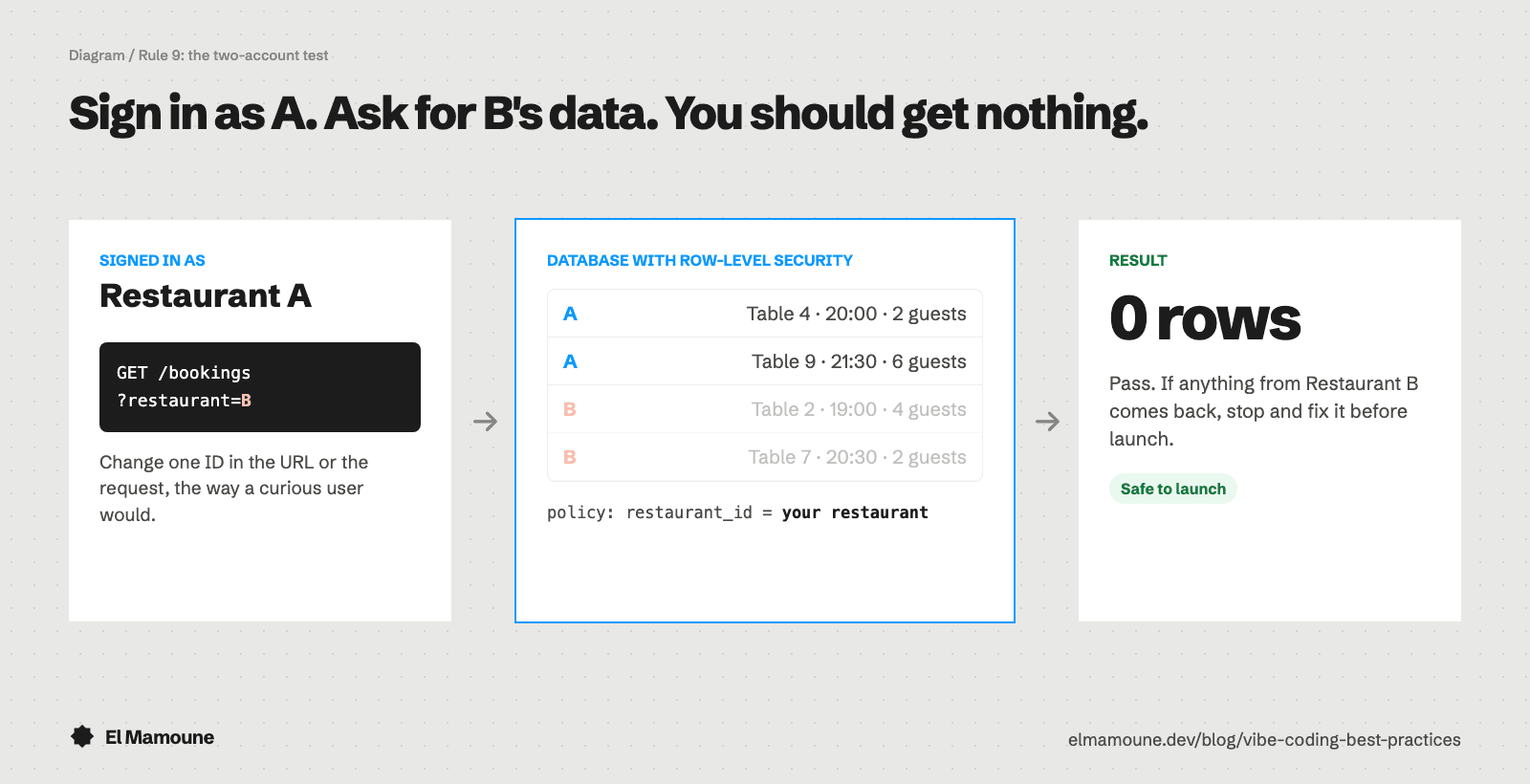
In a SaaS, every restaurant, team or account must only see its own records. Don't trust the AI's word that this is handled. On Supabase I used row-level security, which makes the database itself refuse to return rows that don't belong to the signed-in user, instead of relying on the app code to filter them.
Then test it like an attacker would: create two accounts, sign in as the first, and try to load the second account's data by changing an ID in the URL or in a request. If anything comes back, stop and fix it before launch. The other eight checks worth running are in vibe coding security: 9 risks to check before real users.
10. Keep secrets and sign-in on the server
Anything that reaches the browser is public, including API keys the AI helpfully placed in a front-end file. Keep secret keys in environment variables that only the server reads, and use your platform's built-in authentication, such as Supabase Auth, instead of letting the AI write its own login system. The OWASP secrets management cheat sheet covers the details.
- Search your code for keys before every deploy (GitHub's secret scanning helps), and rotate any key that was ever committed.
- Use separate keys for development and production.
- Make the AI explain how a new endpoint checks who is calling it.
- Turn on your database's backups before you have data worth losing.
11. Test the flows people pay for, end to end
Unit tests check pieces. End-to-end tests check what a user actually does: sign up, book, pay, get the confirmation. For Profilapp I added unit, integration and end-to-end tests, then ran security and UX audits on the main flows before launch.
If you only have time for a few tests, write them for the flows that lose you money or trust when they break. Ask the AI to write them, then break the feature on purpose and check that the test fails.
12. Watch a real user try it
I tested Profilapp with a real restaurant owner and their guests. Watching a guest book from a phone in a noisy room taught me more than any review in Figma or any AI audit. Five minutes of silent watching shows you every label that confuses people and every button they can't find. You don't need many testers: Nielsen Norman Group's research shows about five users find most usability problems.
When to bring in an engineer
Vibe coding can take you a long way, but be honest about the signs that you need an experienced developer to review the code:
- You handle payments, health data or anything regulated.
- Paying customers depend on the app every day.
- The same bug keeps coming back after the AI "fixes" it.
- You can no longer explain how a part of your own app works.
- Pages get slow as real data grows.
A few hours of review at these moments costs far less than a data leak or a rewrite. Ask the reviewer to check against the OWASP Top 10, the standard list of web app security risks. And if the problem is the product rather than the code (confusing flows, a messy UI, low sign-ups), that's a product design job.
Common vibe coding mistakes
- Asking for the whole app in one prompt, then patching the result forever.
- Letting the AI redesign screens you didn't ask it to touch.
- Accepting a new library every time the AI suggests one.
- Staying in one chat for hours until the model forgets the rules.
- Shipping without testing the app with two different accounts.
- Judging the app on a laptop when users are on phones.
Launch checklist
Copy this before you share the link with anyone outside your team.
- The main flows work at 390px and on desktop, in Safari and Chrome
- Sign-up, sign-in and password reset work with a fresh email
- Two test accounts can't see each other's data
- No secret keys in front-end code or in git history
- Production uses its own keys and database
- Backups are on
- End-to-end tests pass for the flows people pay for
- Error messages tell the user what to do next
- Analytics and a way to contact you are in place
- At least one real user has tried it while you watched
Questions people ask
- What are the most important vibe coding best practices?
- Decide what to build before prompting (a short spec and the main screens), ask for one small change at a time, commit every working step, and before launch prove that users can't see each other's data and that the flows people pay for work end to end.
- Is vibe coding safe for a real product?
- It can be, if you treat the AI's code as a draft. Keep secrets on the server, use your platform's authentication, enforce data isolation in the database (for example with row-level security), test with two accounts, and get an experienced developer to review anything involving payments or sensitive data.
- Can a non-developer vibe code a SaaS?
- Yes for a prototype or a first version, especially on a popular stack like Next.js and Supabase. The hard parts are not typing code but deciding what to build, checking that it works for real users, and knowing when to ask an engineer for a review.
- How do I stop the AI from breaking my design?
- Keep your colors, spacing and fonts as tokens in one file, write a rule in CLAUDE.md, AGENTS.md or your Cursor rules that the AI may only use those tokens and existing components, and say in each prompt which screens it must not change.
- Which tools are best for vibe coding?
- App builders like Lovable, Bolt or v0 are fastest for a first prototype. AI coding agents like Claude Code and Cursor give more control once the app is real. I built Profilapp with Claude Code and Cursor on Next.js, Supabase and Vercel. I compared seven of them, with prices, in the best vibe coding tools.
- Do designers have an advantage at vibe coding?
- A real one: they can hand the AI clear screens, a design system and the user flows, which are exactly the things that keep AI-built apps consistent and usable. The gaps to cover are data security and testing.
Vibe coding your SaaS? Send me the link.
I'll reply with a free 5-minute video of what I'd fix first in the design and the flows.
hello@elmamoune.dev