23 vibe coding prompts for building a real SaaS (copy and paste)
By El Mamoune El Baraka, product designer.
Short answer
- A good vibe coding prompt has five parts: the goal, the context, what to do, what not to touch, and how you'll know it's done.
- Use different prompts for different moments: plan without code, lock the design system, build one screen at a time, review, secure, and get unstuck.
- The 23 prompts below are the ones I reuse building SaaS products like Profilapp with Claude Code and Cursor. Copy them, replace the brackets, keep what works.
What makes a vibe coding prompt work
A vibe coding prompt is an instruction you give an AI coding tool, such as Claude Code, Cursor, Lovable or Bolt, so it writes the code for you. The AI fills every gap you leave with a guess, and on a SaaS those guesses add up: a new button style on every screen, a table that breaks on a phone, a query that shows one customer another customer's data.
The fix isn't longer prompts. It's prompts with the right five parts, so there's nothing important left to guess. Anthropic's own prompt engineering guide makes the same point: be clear and direct, give context, and say what good output looks like.
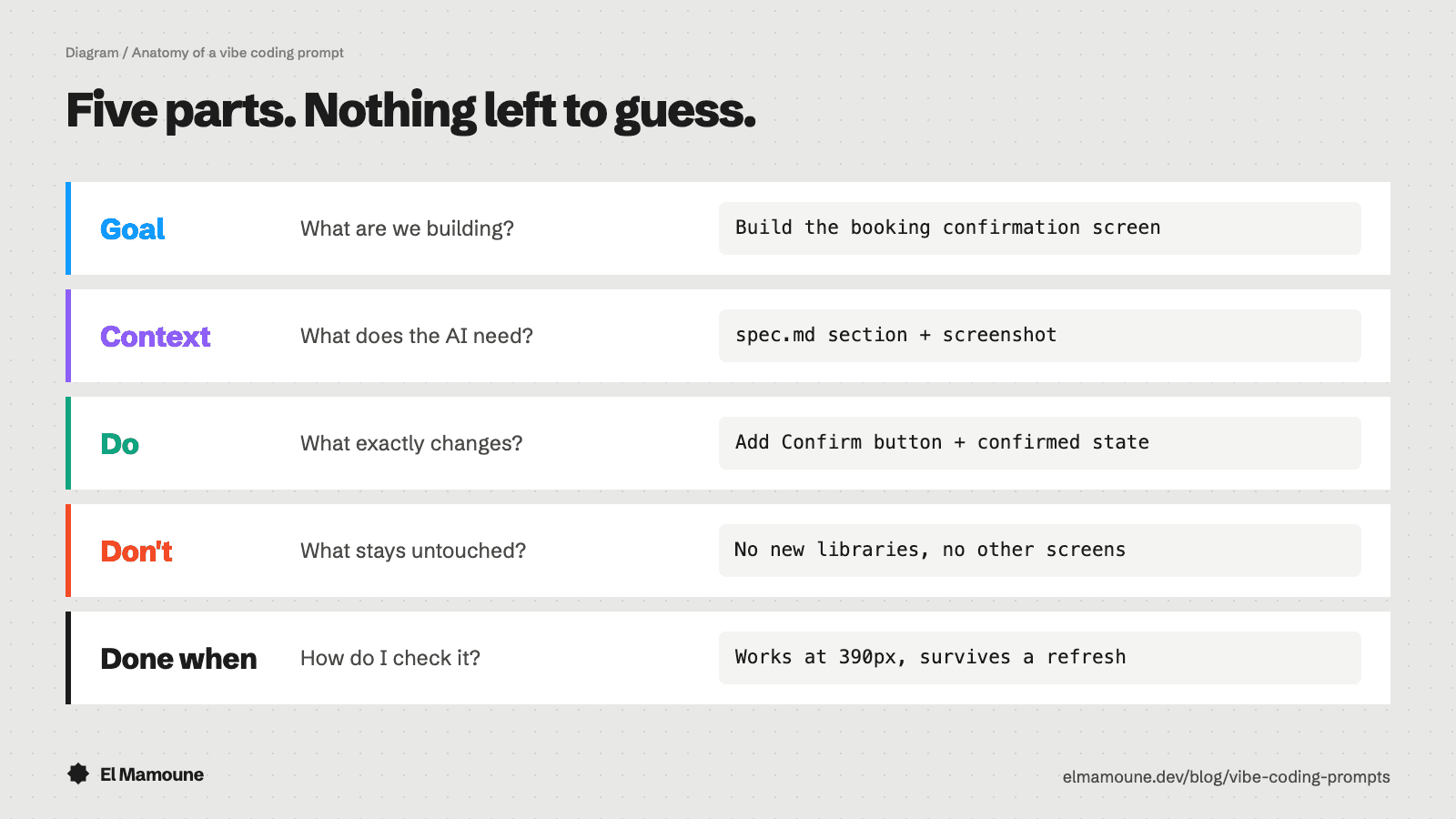
| Part | What it answers | Example |
|---|---|---|
| Goal | What are we building, in one line? | The booking confirmation screen for restaurant owners |
| Context | What does the AI need to know? | The spec section and a screenshot of the design |
| Do | What exactly should change? | Add a Confirm button and a confirmed state |
| Don't | What must stay untouched? | No new libraries, no other screens, no schema changes |
| Done when | How will you check it? | Works at 390px, survives a page refresh |
You won't need all five every time. A small fix needs a goal and a 'don't'. A new feature needs all of them. I wrote more about the process around these prompts in vibe coding best practices.
Planning prompts (no code yet)
These prompts produce zero code on purpose. They're the cheapest place to find out what you actually need, and most AI tools have a plan mode for exactly this (in Claude Code it's built in).
1. Turn an idea into a spec
Use it when you only have an idea. The AI interviews you instead of guessing.
I want to build [one sentence about the product].
Don't write any code. Interview me first: ask me up to 10 questions, one at a time,
about the users, what they need to get done, the rules, and the edge cases.
When we're done, write a one-page spec.md with: product, users and jobs,
rules, edge cases, and what is out of scope for version 1.
2. Slice the spec into buildable steps
Use it right after the spec. Big asks fail; small ordered steps don't.
Read spec.md. Break version 1 into 8 to 15 small steps that can each be built
and checked on their own, in the order I should build them.
For each step: one line on what it does and one line on how I'll check it works.
Put screens before backend, and the core flow before anything else.
3. Plan one feature before building it
Use it before every feature. Reading a ten-line plan is faster than untangling eight changed files.
Plan only, no code. I want to add [feature].
List the files you'd create or change, what you'd add to each,
any new library you'd need and why, and every assumption you're making.
Ask me about anything unclear before we start.
Design system prompts
This is the stage most prompt lists skip, and it's why vibe coded apps often look like ten different apps. Lock the look once, and every later prompt inherits it.
4. Set up design tokens
Use it before the first screen. Tokens are the named colors, sizes and spacing every component must use (Tailwind calls them your theme).
Set up the design tokens for this app in one place (the Tailwind theme / globals.css):
- Colors: background, surface, text, muted text, border, primary, danger, success
- Font: [font name], with a type scale for h1, h2, h3, body, small
- Spacing and radius scale
- Light and dark values for every color
Then show me a single test page that uses every token, so I can check them together.
5. Write the rules file the AI reads every time
Use it once per project. The AI reads this file at the start of every session, so a rule written once applies to every prompt: CLAUDE.md for Claude Code, AGENTS.md for most other agents, or rules in Cursor.
Create a CLAUDE.md (or AGENTS.md) with these rules and keep it under 40 lines:
- Use only the design tokens. Never hard-code a color, size or font.
- Reuse components from /components before creating a new one.
- Build every screen for 390px wide first, then desktop.
- Don't change the layout or style of a screen unless the task says so.
- Don't add a library without asking me first.
- Every list has an empty, loading and error state.
6. Copy the layout of a reference, not its look
Use it with a screenshot of something you like. Saying what to keep and what to ignore is the difference between inspiration and a mess. For a marketing page, good references are in these 8 SaaS landing page examples, broken down section by section.
[attach screenshot]
Use only the layout and hierarchy of this screenshot: where things sit and how big they are.
Ignore its colors, fonts and copy. Use our tokens and our content:
[describe your content]. Build it as [page or component name].
SaaS screen prompts
One screen or one component per prompt. These cover the screens every SaaS needs and AI tools get wrong when you don't spell them out.
7. Build one screen from a design
Use it for any new screen. This is the five-part structure in practice.
Goal: build the [screen name] screen.
Context: [paste the spec section] and the attached design.
Do: build only this screen, using our tokens and existing components.
Don't: change any other screen, the database, or add libraries.
Done when: it matches the design at 390px and 1440px, and all buttons work.
8. A dashboard that stays readable
Build the dashboard for [user type]. They open it to answer one question:
[the question, e.g. "what needs my attention today?"].
Put the answer at the top. Show at most 4 key numbers, each with a label and the period.
Below, one list of items that need action, newest first.
On a phone, stack everything in one column. No charts unless I ask.
Starting from the user's question is what keeps a dashboard from becoming a wall of widgets.
9. Empty, loading and error states
Use it after every list or data screen. These states are where AI-built apps feel unfinished. Nielsen Norman Group has good guidance on empty states and error messages.
For the [screen name] screen, add three states:
- Empty: one sentence on what will appear here and one button to create the first item.
- Loading: skeletons in the shape of the real content, not a spinner.
- Error: say what went wrong in plain words and give a Retry button.
Don't change the normal state.
10. Onboarding that gets to value fast
Build the first-run experience for a new [user type].
They should reach [the first useful result] in under 2 minutes.
Ask only what's needed to get there; everything else can wait until later.
Show progress if there's more than one step. Let them skip and come back.
11. A settings page that doesn't sprawl
Build the settings page. Group settings into sections: [e.g. Profile, Team, Notifications, Billing].
Each setting: a short label, one line of help text, and the control.
Save changes per section with a clear "Saved" confirmation.
Put dangerous actions (delete account) in a separate section at the bottom, with a confirm step.
12. Forms with real validation
Add validation to the [form name] form:
- Check fields as the user leaves each one, not on every keystroke.
- Show the error under the field, saying how to fix it.
- Keep what the user typed when there's an error.
- Use the right input types (email, tel, number) so phones show the right keyboard.
- Validate again on the server; never trust the browser alone.
The right input types are a small detail that makes forms much easier on a phone.
13. Responsive and right-to-left pass
Use it after a screen works on desktop. Profilapp had to work in English, French and Arabic, so this prompt ran on every screen.
Check the [screen name] screen at 360px, 390px, 768px and 1440px.
Fix anything that overflows, overlaps or needs horizontal scrolling.
Tap targets must be at least 44px. Then switch the page to dir="rtl"
and fix anything that doesn't flip, using logical properties (ms-, me-, ps-, pe-).
Review prompts
Run these in a new chat, so the AI isn't grading its own work with the same context that wrote it.
14. Design QA against your tokens
Review [screen or folder] for design consistency. Don't fix anything yet.
List every hard-coded color, font size, spacing or radius that should use a token,
every component that duplicates one in /components,
and every button or heading that looks different from the same element elsewhere.
Then propose the smallest set of changes to fix them.
15. Accessibility check
Check [screen name] against WCAG 2.2 AA. List problems with:
text contrast, keyboard navigation and visible focus, labels on every input and icon button,
heading order, and anything that only works with a mouse or only uses color to show meaning.
Fix them one at a time and tell me what you changed.
The WCAG 2.2 quick reference is the checklist to compare against.
16. Rewrite the interface copy
Rewrite all button labels, headings, empty states and error messages on [screen name]:
plain words, sentence case, and name things the way the user would, not the way the code does.
Buttons say what happens ("Save changes", not "Submit").
Show me a before/after table before changing anything.
17. Find the edge cases
For [feature], list what happens when: a field is empty, text is very long,
there are 0 items and 1,000 items, the network is slow or drops,
the user double-clicks the main button, and two people edit the same thing.
Mark which ones are broken today. Fix the broken ones one by one.
Security prompts
Prompt lists almost never include these, and they're the ones that matter most once real customers use your SaaS. They don't replace a review by an experienced developer for anything involving payments or sensitive data. For the full list of risks and a pre-launch checklist, see vibe coding security.
18. Check that customers can't see each other's data
On Supabase this means row-level security. I explain the two-account test in rule 9 of vibe coding best practices.
List every table that holds customer data and show me the access rule on each.
For each one, explain how the database stops a signed-in user of account A
from reading or changing rows that belong to account B.
Flag any table where the protection only lives in the frontend code.
Then write a test that signs in as A and tries to read B's data. It must get nothing.
19. Find secrets in the wrong place
Search the whole project, including git history, for API keys, tokens and passwords.
List any that are in frontend code, committed files or logs.
Move them to server-only environment variables and tell me which keys I must rotate.
The OWASP secrets management cheat sheet explains why rotating a leaked key matters more than deleting it.
20. End-to-end tests for the flows people pay for
Write Playwright end-to-end tests for these flows: [sign up, the core action, payment].
Each test acts like a real user at phone size: clicks, types, waits for the result.
Then break each feature on purpose and confirm its test fails.
Playwright runs these in real browsers. Breaking the feature on purpose proves the test actually checks something.
Prompts for when the AI gets stuck
Every vibe coder hits the loop where the AI fixes one bug and creates another. These three prompts get you out.
21. Explain before fixing
Don't change any code yet. Here is the error: [paste it].
Explain in plain words what's causing it and where.
Then propose the smallest change that fixes it, and what could break because of that change.
22. Stop the loop
Use it after the second failed fix. Then go back to your last working commit and start a fresh chat.
Stop. We've tried [what was tried] and it didn't work.
Summarise what we know, what we've ruled out, and two completely different approaches.
I'll go back to the last working commit and we'll try the simplest one in a new chat.
23. Save what worked as your own prompt
Use it after solving anything tricky. This is how your personal library grows past these 23.
Based on what we just fixed, write a short reusable prompt I can use
the next time this kind of problem happens, with brackets for the parts that change.
Then suggest one rule to add to CLAUDE.md so it doesn't happen again.
Vibe coding vs prompt engineering
Prompt engineering is the general skill of writing instructions that get reliable results from an AI model. Vibe coding is one use of it: building software by prompting an AI coding tool and letting it write most of the code.
So the two overlap, but they aren't the same. You can prompt-engineer without writing any software, and you can vibe code with weak prompts (you'll just get worse apps). The prompts in this article are prompt engineering applied to one job: building a SaaS that looks consistent, works on a phone and keeps customer data safe.
Mistakes that make prompts fail
- Asking for a whole page or feature in one prompt.
- Describing what you want, but not what must stay untouched.
- No way to check the result, so 'done' means 'it compiles'.
- Pasting a reference screenshot without saying what to keep and what to ignore.
- Staying in one long chat until the AI forgets the rules.
- Letting the same chat that wrote the code review it.
If you'd rather have a designer handle the screens and the design system while you build, that's what I do. And for a deeper take on prompting for designers, Anna Arteeva's prompting guide is worth reading.
Questions people ask
- What is a good vibe coding prompt?
- One with five parts: the goal in one line, the context the AI needs, exactly what to do, what not to touch, and how you'll check it's done. Small fixes only need the goal and the 'don't' part.
- What are some vibe coding prompt examples?
- A spec interview ('ask me 10 questions before writing code'), a design token setup, a one-screen build with Do / Don't / Done when, empty and error states, a data isolation check and an 'explain before fixing' debugging prompt. All 23 are in this article.
- Is vibe coding the same as prompt engineering?
- No. Prompt engineering is the general skill of instructing AI models. Vibe coding is building software by prompting an AI coding tool. Good vibe coding uses prompt engineering, applied to code.
- How long should a vibe coding prompt be?
- Usually 3 to 8 lines. Long enough to state the goal, context, scope and how to check the result, short enough to cover one screen or one change. Put rules you repeat in a CLAUDE.md, AGENTS.md or Cursor rules file instead of every prompt.
- Do these prompts work in Lovable, Bolt, Cursor and Claude Code?
- Yes. They're plain instructions, not tool-specific syntax. In Claude Code and Cursor you can also put the repeated rules in a project file; in app builders like Lovable or Bolt, paste the rules at the start of a session. Not sure which tool to use? See the best vibe coding tools, compared.
Vibe coding your SaaS? Send me the link.
I'll reply with a free 5-minute video of what I'd fix first in the design and the flows.
hello@elmamoune.dev