The best vibe coding tools in 2026, picked by a product designer
By El Mamoune El Baraka, product designer.
Short answer
- There is no single best vibe coding tool. There are three jobs: exploring an idea (Figma Make, v0), building a working app in the browser (Lovable, Bolt, Replit), and owning the code once it gets serious (Cursor, Claude Code).
- For UI quality, v0 and Figma Make give the cleanest screens. For a full app without touching code, Lovable is the easiest start and Bolt gives you more control. For a real product, move to Cursor or Claude Code.
- Most tools start free and cost $20 to $30 a month for real use. The expensive part is not the plan, it's the credits you burn on prompts that fix the AI's own mistakes, so a clear brief saves more money than any plan choice.
Why a designer's list
Search for the best vibe coding tools and you get lists written for developers or by companies selling one of the tools. They compare speed, models and integrations. Almost none of them look at what a client actually sees: the interface. Does it look like your brand, does it hold up on a phone, does it have empty and error states, or does it look like every other AI-generated app?
I'm a product designer. I've designed for 64 clients and I built my own SaaS, Profilapp, with AI coding tools. So this list judges the tools on the things I'm paid to care about. The prices and plans below were checked on each tool's official pricing page in November 2026. They change often, so check the linked pages before you pay.
How I judged them
Six questions, all about the result rather than the hype. A tool doesn't need to win all six, but you should know where it loses before you build on it.
| Question | Why it matters |
|---|---|
| Does it follow a design system? | Without tokens, every new screen drifts: new colors, new spacing, new button styles. |
| Does it build real states? | Empty, loading and error states are what separate a demo from a product. |
| Does it hold up on a phone? | Most of your users arrive on mobile. Many AI layouts are designed for a laptop only. |
| Can you edit visually? | Changing a margin with a prompt costs credits and patience. A visual editor is faster. |
| Can you take the code with you? | GitHub sync or export decides whether you can move to a real editor later. |
| Is there a real backend? | Auth, a database and permissions turn screens into an app people can sign in to. |
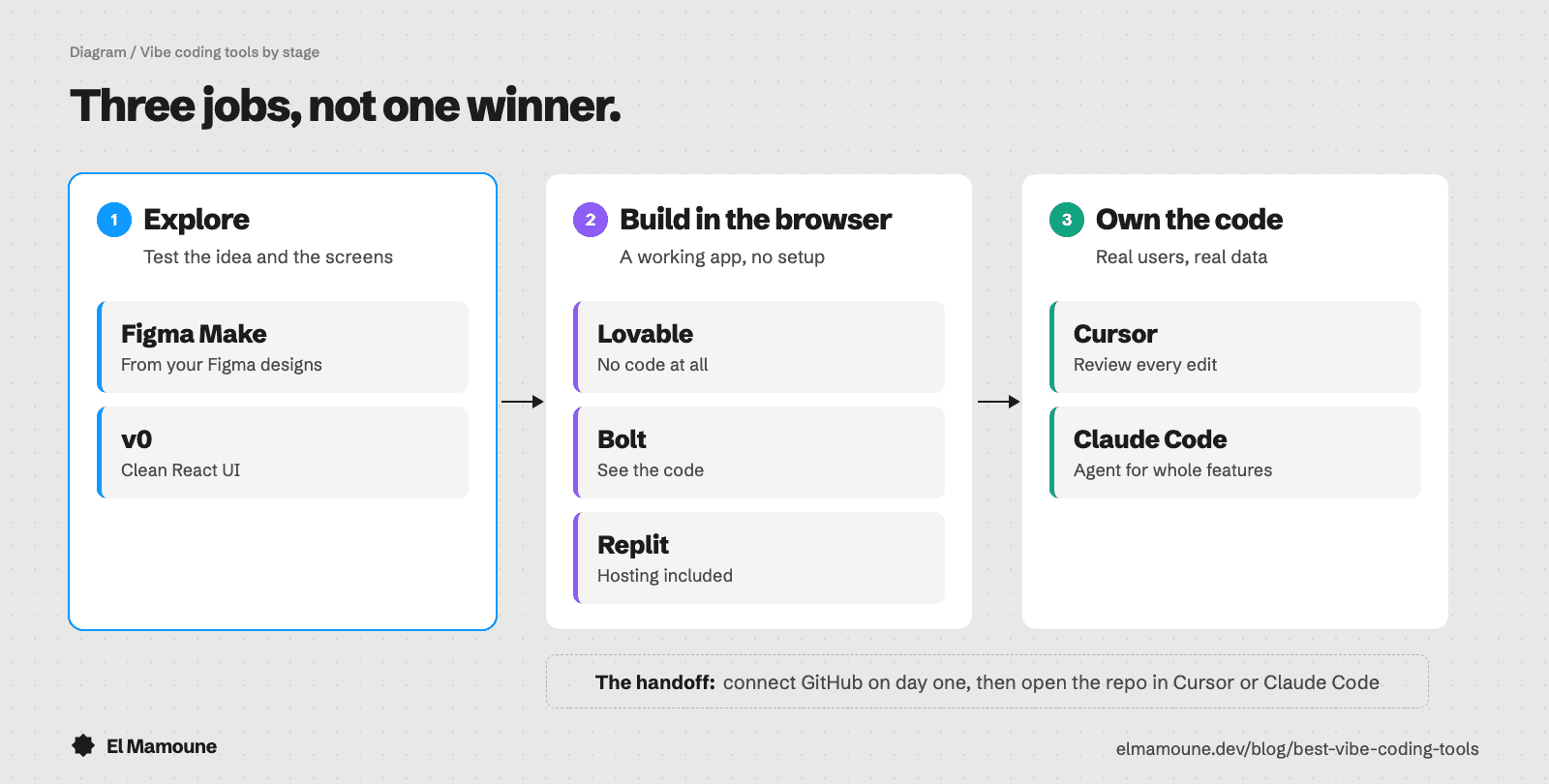
The map: three jobs, not one winner
The most useful thing I can tell you: stop looking for one tool. Each tool is built for a stage, and the good workflow moves between them. You explore in a design-first tool, build a working version in a browser builder, and move the code to an AI editor once real users and real data are involved.
The best vibe coding tools compared
Prices are the entry paid plan per month, from the official pricing pages in November 2026. All seven have a free way to try them.
| Tool | Job | Best for | Paid plans from | Take the code |
|---|---|---|---|---|
| Figma Make | Explore | Designers turning Figma screens into clickable prototypes | Included in Figma seats (AI credits) | Limited |
| v0 | Explore + UI | Clean React screens and components | $30/user | Yes, GitHub sync |
| Lovable | Build in browser | Non-coders building a full app | $25 | Yes, GitHub sync |
| Bolt | Build in browser | Full-stack apps with more control | $25 | Yes, export and GitHub |
| Replit | Build in browser | Everything in one place, hosting included | Core, $204/year | Yes |
| Cursor | Own the code | Editing a real codebase with AI | $8 (Plus) | It is your code |
| Claude Code | Own the code | Agentic work across a whole project | $20 (Claude Pro) | It is your code |
1. Figma Make: the designer's starting point
Figma Make turns a prompt or an existing Figma design into a working prototype, inside the tool most designers already use. For a designer that's the shortest path from a static screen to something a client can click.
Where it shines: it starts from your own designs, so the result looks like your product instead of a generic template. Where to watch out: it runs on Figma's AI credits, and many designers complain that iterations burn through them quickly. It's a prototyping tool first, not the place to run a production app.
- Use it when: you have Figma screens and want to test the flow with real users before anyone writes production code. To send those screens straight to a coding agent instead, see how to set up Figma MCP with Claude Code.
2. v0: the cleanest UI out of the box
v0 by Vercel generates React screens with Tailwind and shadcn/ui components, the same stack many SaaS teams use. Of all the tools here, it gives the most consistent, professional-looking interfaces from a short prompt. Its Design Mode lets you adjust the result visually, it syncs with GitHub and it deploys to Vercel in one click.
Where to watch out: it's strongest on the front end. For auth, a database and business logic you'll connect other services yourself. Pricing is credit-based: the free plan has a daily message limit and Plus is $30 per user per month with monthly credits.
- Use it when: you want polished screens or components fast, or you're building the UI for an app whose backend lives elsewhere.
3. Lovable: the easiest full app for non-coders
Lovable builds a complete web app from a chat: screens, a database, sign-in and hosting. It has a visual editor for small changes, so you don't spend credits moving a button, and it syncs your project to GitHub. For a founder with no code background, it's the fastest path to something people can sign up to.
Where to watch out: apps built in Lovable tend to share a recognisable look unless you give it your own design direction. Bring your colors, type and a reference screen into the first prompt. Pricing runs on credits: there's a free plan with daily credits and Pro is $25 a month.
- Use it when: you need a working MVP to show investors or first users, and you don't want to touch code.
4. Bolt: a full-stack builder with more control
Bolt by StackBlitz also builds full apps in the browser, but it feels closer to a code editor: you see the files, the terminal and the running app side by side. That makes it a good middle step for semi-technical builders who want to understand what the AI wrote.
Bolt bills in tokens rather than credits. The free plan includes 1M tokens a month with a daily limit, and Pro is $25 a month starting at 10M tokens, with unused tokens rolling over. The Teams plan adds design system knowledge, which matters if you want every screen to follow the same components.
- Use it when: you want a browser builder but also want to see and steer the code.
5. Replit: everything in one place
Replit combines an AI agent, an editor, a database and hosting. You describe the app, the agent plans and builds it, and it's live on a URL without setting anything else up. It's the most complete all-in-one option, and it's not limited to web front ends.
Where to watch out: agent work is billed by effort, including planning conversations, so long back-and-forth sessions add up. The Core plan is $204 a year with $20 of monthly credits. Out of the box, the interfaces are functional rather than designed, so plan to bring your own design direction.
- Use it when: you want one tool from idea to live app, including backend and hosting.
6. Cursor: when the code becomes yours
Cursor is a code editor with AI built in, based on VS Code. It's where a project goes when it outgrows a browser builder: you open the repository from GitHub and work with an agent that can read and change the whole codebase. I used it to build Profilapp, mostly for focused changes where I wanted to see every edit.
For design work, its strength is control. You can point it at your design tokens, your components and a rules file, and it follows them. Cursor recently moved to new plans: there's a free plan and paid plans from $8 a month, with more usage on the higher tiers.
- Use it when: you have a real codebase, real users, and you want to review each change before it ships.
7. Claude Code: an agent for the whole project
Claude Code is Anthropic's coding agent. It works across your project from the terminal, the desktop app or your editor: it plans, edits many files, runs tests and fixes what fails. On Profilapp it did most of the heavy lifting, from building features to writing tests, while I reviewed the result as a designer.
Its weakness is the same as its strength: it can change a lot at once. Give it a clear spec and a rules file, and ask it to plan before it builds. It's included in Claude's paid plans, starting with Pro at $20 a month. The free plan doesn't include it.
- Use it when: you want an agent to build and test whole features, and you're ready to review its work.
Lovable vs Bolt: which one should you pick?
These two are compared more than any others, because they promise the same thing: describe an app, get a working app. The difference is who they're built for.
| Lovable | Bolt | |
|---|---|---|
| Feels like | A product builder with a chat | A code editor with a chat |
| Best for | Non-coders, founders, designers | Semi-technical builders |
| Editing | Visual editor for small changes | Files, terminal and preview side by side |
| Backend | Built in: database, auth, hosting | Built in, with a choice of database provider |
| Billing | Credits, Pro from $25/month | Tokens, Pro from $25/month |
| Leaving later | GitHub sync | Export and GitHub |
My take: if you never want to see code, start with Lovable. If you want to understand what's being built and steer it, start with Bolt. In both cases, connect GitHub from day one so you can move the project to Cursor or Claude Code when it gets serious.
The stack I used to ship a real SaaS
For Profilapp I skipped the browser builders and went straight to owning the code, because I knew it had to handle real bookings and real restaurant data. The stack was: a written spec, the design in Figma, Claude Code and Cursor for the build, Supabase for the database and auth, and Vercel for hosting. The full story, with what the AI did and didn't do, is in the Profilapp case study.
If I were starting a smaller idea today, I'd explore it in v0 or Figma Make, validate it with a few users, and only then rebuild it properly with Claude Code. Throwing away a prototype is cheap. Fixing a product built on one is not.
How to get good UI out of any of these tools
The tool matters less than the brief. These five habits improve the result in every tool on this list. The full method, with a DESIGN.md template, is in vibe coding UI design.
- Give it your design tokens before the first screen: colors, type, spacing, radius. Tell it never to hard-code a value. The exact prompt is in my 23 vibe coding prompts.
- Attach a reference screenshot and say what to keep (layout, hierarchy) and what to ignore (colors, fonts, copy).
- Ask for empty, loading and error states on every list and form. They're never there unless you ask.
- Check every change at 390px wide, the size of most phones, before you accept it.
- For marketing pages, follow a proven structure. These 8 SaaS landing page examples show the seven sections that work.
For the full workflow, from the first prompt to a launch checklist, read 12 vibe coding best practices.
Pick your tool in 30 seconds
- You have Figma designs and want a clickable prototype: Figma Make.
- You want beautiful screens or components fast: v0.
- You can't code and need a working MVP: Lovable.
- You want a browser builder but want to see the code: Bolt.
- You want idea to live app in one tool, hosting included: Replit.
- You have a real codebase and want to review every change: Cursor.
- You want an agent to build and test whole features: Claude Code.
And if you'd rather have a designer do it: I design SaaS products in Figma and build them with these tools, from prototype to a working app. See my services or get a free 5-minute audit of your product.
Questions people ask
- What is the best vibe coding tool?
- There isn't one best tool, there is a best tool per stage. For exploring ideas, v0 and Figma Make. For building a full app without code, Lovable or Bolt. For a real product with real users, Cursor or Claude Code. Many builders use two: one to prototype, one to build.
- What is the best free vibe coding tool?
- Most of them have a usable free plan. Bolt's free plan includes 1M tokens a month, Lovable gives daily credits, v0 allows a few messages a day and Cursor has a free tier. For a quick prototype, any of them is enough. For a full project, you'll need a paid plan within days.
- Lovable or Bolt: which is better?
- Lovable is better if you never want to see code: it feels like a product builder and has a visual editor. Bolt is better if you want to see the files and steer the code. Both start at $25 a month for Pro, and both let you move the project to GitHub.
- Cursor or Claude Code for vibe coding?
- Cursor is an AI code editor: best when you want to see and approve each change. Claude Code is an agent: best when you want it to build and test whole features across the project. Many people use both, and that's what I did to build Profilapp.
- Can a designer vibe code without knowing how to code?
- Yes, for prototypes and MVPs, especially with Figma Make, v0 or Lovable. For a product that holds customer data, you need to understand enough to review what the AI builds, or work with someone who does. Security and data access are where AI-built apps most often fail.
Vibe coding your SaaS? Send me the link.
I'll reply with a free 5-minute video of what I'd fix first in the design and the flows.
hello@elmamoune.dev